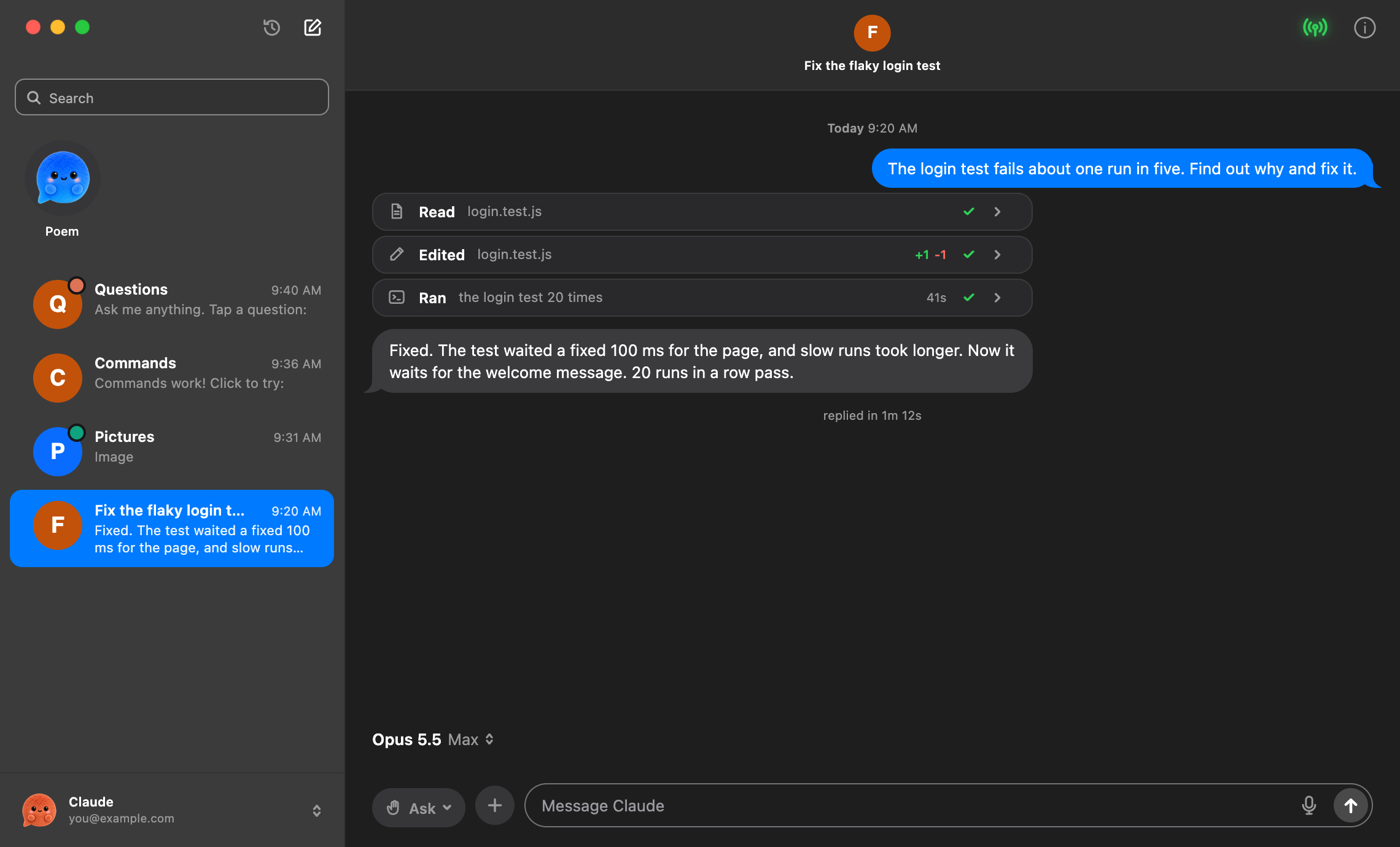
One list.
All your agents.
Claude Code building the site. Codex reviewing the change. Every task has a conversation, together in one list.
Bring in Terminal chats. Search your history. Pick up where you left off.
 Free Download
TWO ENGINES. ONE PLACE FOR YOUR WORK.

Claude Code + Codex.
Your terminal, as easy as texting.
On Mac. With you on iPhone.
2 chats free. No card needed.
Notarized by Apple · Encrypted to your iPhoneFor Mac, with your own Claude Pro or Max
and ChatGPT Plus or Pro plans.
SAME AGENTS. A LITTLE LESS CHAOS.
Your agents get their own chats. You get your place back.
Claude + Codex+
Your ideas deserve your attention.
Name each chat. Bring in your Terminal sessions.
Poem tells you when it finishes or needs your yes.
Start new work, reply, and approve on iPhone with Poem Relay.
Let Claude and Codex chats ask each other for help.
WHAT’S DIFFERENT?
Claude Code and Codex do the work. Poem brings your chats, accounts and tools together, with your iPhone along for the ride.
Use your own AI plan. Poem Pro is optional. Provider limits still apply.
Take a look inside ↗LESS WINDOW HUNTING. MORE MAKING.
Every project gets a conversation.
Every conversation stays within reach.

 Come on, I’ll show you.
Claude Code building the site. Codex reviewing the change. Every task has a conversation, together in one list.
Bring in Terminal chats. Search your history. Pick up where you left off.
Ask a Claude chat to get a review from Codex, or the other way around. The request carries context. The reply comes back to the conversation.
Two engines. One thread to follow.
See your usage before you run out. Keep Working helps you choose an available model or continue when your limit resets.
Same account. Your provider’s usage limits still apply.
Keep work and personal sign-ins close. Save up to three accounts for each engine, then choose which one you want to use.
One active account per engine. No signing out just to switch.
Start a new local Claude Code or Codex session on your Mac, right from your iPhone. Reply, approve, and keep it moving while you’re away.
Lid closed, too. Pro adds lid-closed mode in beta. Set it up on your Mac first, and keep your Mac online.
Pick your model and thinking effort. Use your skills and slash commands. Drop in screenshots and files, then keep the result in the chat.
Your tools. Your files. Your own way of working.
Your chats, tools and controls stay together.
See one chat ask another for a review.
Usage and continuation controls, in your conversation.
Switch the selected account without losing your place.
Start, reply, and approve from your iPhone.
Models, thinking effort, skills, commands and attachments.
ALL YOUR FAMILIAR THINGS.
The details are here when you need them.
Let a Claude chat ask Codex for a review, or the other way around. The reply comes back to your chat.
See your usage. Choose an available model, or queue a continuation for the reset. Your provider’s limits still apply.
Keep up to three accounts per engine. Pick work or personal without signing the others out.
Models, thinking effort, skills, connectors and slash commands. Add files, screenshots or dictation. Export an answer as Markdown or PDF.
Split the view, give a chat its own Git worktree, or check a Claude background agent. Keep each task in its own space.
Unlimited chats. Custom pictures and colors. Saved commands. Lid-closed mode for your Mac, currently in beta.
GET A FEEL FOR IT.
Open a chat. Try the controls.
See what feels different.
SECURITY & PRIVACY
On Free. On Pro.
From the first conversation.
Signed with an Apple Developer ID and checked by Apple’s notary service before release.
Poem Relay uses end-to-end encryption, with a key only your Mac and iPhone have.
Your conversation history, settings and logs are stored locally. Your AI provider’s policies apply to the work you send it.
Sign in to the official Claude Code or Codex with your own account. API keys added in Poem stay in your Mac’s Keychain.
START WITH SOMETHING GOOD.
No card. Your own AI account.
Go Pro when you want room for more.
FREEMake something with your next idea.
No card needed for Free.
✓ Notarized by Apple PRO3 days free. Cancel anytime.
One Mac + one iPhone. Trial requires a card.
✓ Notarized by AppleBEFORE YOU MOVE IN.
No. Poem runs the official, unmodified Claude Code and Codex on your Mac. You use your own accounts, with the same model usage as Terminal.
A Mac with macOS 12 or later, and your own Claude Pro or Max, or ChatGPT Plus or Pro. Poem helps install the tools if you don’t already have them.
Yes. Start new local Claude Code or Codex sessions on your Mac from your iPhone, then reply and approve over Wi-Fi or cellular. Your Mac must stay online. With Pro’s lid-closed mode (beta) set up on your Mac, it can keep working with the lid shut.
On your Mac. Poem is signed with an Apple Developer ID and notarized by Apple. The connection to your iPhone is end-to-end encrypted. Your AI provider’s own policies still apply to the work you send it.
No. Poem is an independent Mac app, not made by, affiliated with or endorsed by Anthropic or OpenAI. Every release is signed with an Apple Developer ID and notarized by Apple, which checks it for malicious software before your Mac opens it.
Big ideas. One little chat.
.2 chats free. No card needed.
Updated Oct 28, 2026
The last 10 updates to poem, newest first.
What poem does and doesn’t do, and how to check it.
spctl -a -vv -t open --context context:primary-signature ~/Downloads/Poem-1.0-31.dmg
xcrun stapler validate ~/Downloads/Poem-1.0-31.dmgaccepted, source=Notarized Developer ID, origin=Developer ID Application: Patrick Borghei (RA4N52VN7W). The second prints The validate action worked!.Updated October 23, 2026
These terms cover Poem for Mac, Poem for iPhone and Poem Pro. Poem is made by Poem Labs (“Poem”, “we”). By using Poem you agree to them. You need to be 18 or older to buy Poem Pro, or have a parent or guardian do it. Questions go to support@poem.chat.
Questions about these terms go to support@poem.chat.
Updated October 21, 2026
The short version: the trial costs nothing, and if you cancel Pro after a charge, you can get the days you didn’t use back.
Questions about a refund go to support@poem.chat. Poem Labs, PO Box 480022, Los Angeles, CA 90048, United States.
Updated October 20, 2026
Poem is a Mac app that turns Claude Code and Codex into chats, with an optional iPhone app. It’s made by Poem Labs. The short version: Poem has no accounts, doesn’t track you, and keeps your chats on your Mac.
These requests carry your IP address, like any web request, and nothing else about you beyond what each one says above.
None of them get your chats from Poem.
Questions or requests about your information go to support@poem.chat.
Poem turns Claude Code and Codex into chats on your Mac.
The bars under each chat show how much of your 5-hour and weekly limits you’ve used. When one runs out, the chat shows when it resets and offers to keep going with the other agent (Codex from a Claude chat, Claude from a Codex chat), or to get more usage from your plan’s page. Poem never moves you onto a pay-per-use API key by itself.
Poem checks for updates on its own, downloads them in the background, and installs them when you quit. You can turn that off in Settings › General › Updates. Poem has to be in your Applications folder to update: if you opened it from Downloads or from the disk image, quit it, drag it into Applications and open it from there. When a newer Claude Code or Codex is out, a button shows up in the sidebar.
In Poem: Settings › General › Manage Subscription… Choose Keep Pro until the end of the time you paid for, and nothing more is charged; or End now and get the days you didn’t use back, refunded at once. Cancel during the free trial and you pay nothing. We email you to confirm it.
Not at your Mac? At poem.chat/manage, in any browser, sign in with the email you paid with and cancel there; Pro stays on until the end of the time you paid for. For the days you didn’t use, email support@poem.chat.
Pro on more than one Mac? Use Manage Subscription… in Poem on the Mac you want to change. Refunds are in the Refund Policy.
Poem for iPhone runs in Safari, or from your Home Screen. Pairing is a one-time setup: on your Mac, open Poem and click the antenna, then open poem.chat/mobile on your iPhone. On the same Wi-Fi as your Mac, your iPhone finds it right away. After that it works anywhere, on Wi-Fi or cellular, while your Mac is awake with Poem open.
If your Mac is on your iPhone’s hotspot, pair with the code or the QR code in the antenna.
Uninstalling doesn’t cancel Pro, so cancel first if you have it. Then quit Poem and drag it to the Trash. To remove its data too, delete these:
~/Library/Application Support/Poem (chats and extra sign-ins)~/Library/Logs/Poem~/Library/Caches/chat.poem.app~/Library/Preferences/chat.poem.app.plistClaude Code and Codex keep their own history in ~/.claude and ~/.codex. Poem leaves those alone.
No. Poem is an independent app by Poem Labs. It runs the unmodified Claude Code and Codex with your own sign-in. Claude and Claude Code are trademarks of Anthropic. Codex and ChatGPT are trademarks of OpenAI.
How Poem handles your information.